SuiteCRM Tag Management: Organize and Categorize CRM Data Effectively
⚡ Quick Summary / Key Takeaway
SuiteCRM Tag Management: SuiteCRM Tag Management is a strategic organizational feature that allows users to assign custom keywords to CRM records. By utilizing tags, enterprise teams can rapidly categorize, filter, and retrieve cross-module data, bypassing rigid folder structures and significantly improving overall CRM search speed and user adoption.
Table of Contents
In a rapidly growing enterprise, customer data can quickly become disorganized, leading to lost opportunities and frustrated sales teams. Relying solely on traditional dropdown menus and rigid folder structures often limits how flexibly you can segment your accounts, contacts, and leads. This is where mastering **SuiteCRM Tag Management** becomes essential. By implementing a robust tagging architecture, your team can dynamically categorize records across multiple modules, accelerating search times and enabling highly targeted marketing campaigns. In this comprehensive guide, we will explore the core benefits of tagging, how to implement professional plugins to extend native capabilities, and the architectural best practices needed to maintain a pristine CRM database.
Why Your Business Needs Robust SuiteCRM Tag Management
Key Business Benefits
* Lightning-Fast Data Retrieval: Tags act as high-visibility markers. Instead of building complex database queries, sales reps can click a tag to instantly view all related leads, accounts, and opportunities.
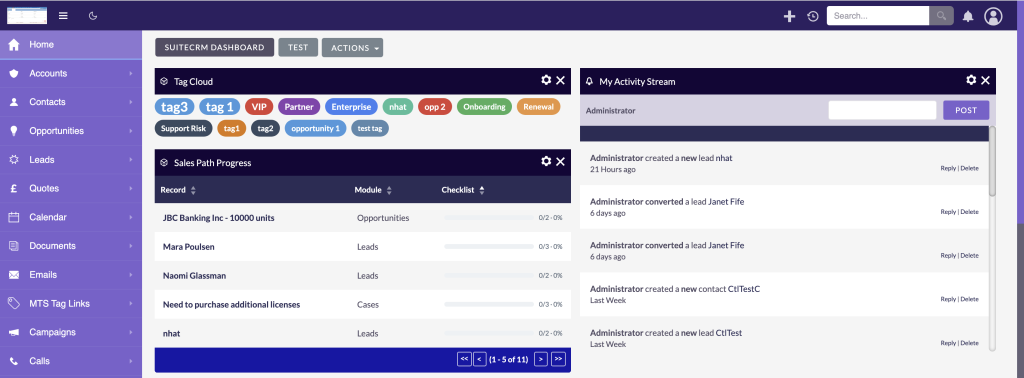
* Cross-Module Connectivity: A single tag like ‘VIP Client’ or ‘Q3 Campaign’ can be applied to Accounts, Contacts, and Meetings alike, instantly linking disparate records under a unified theme.
* Agile Segmentation: Marketing teams can dynamically tag subsets of contacts for specialized email blasts without requiring administrators to modify the CRM’s core database architecture.
Implementing a structured tagging strategy empowers end-users to manage their own workflows while keeping the underlying database architecture clean and scalable.
Core Capabilities of a Modern SuiteCRM Tags Plugin
Essential Features to Look For
1. Centralized Tag Administration: Administrators must have a dedicated panel to review, merge, and delete tags globally, preventing database bloat caused by user typos.
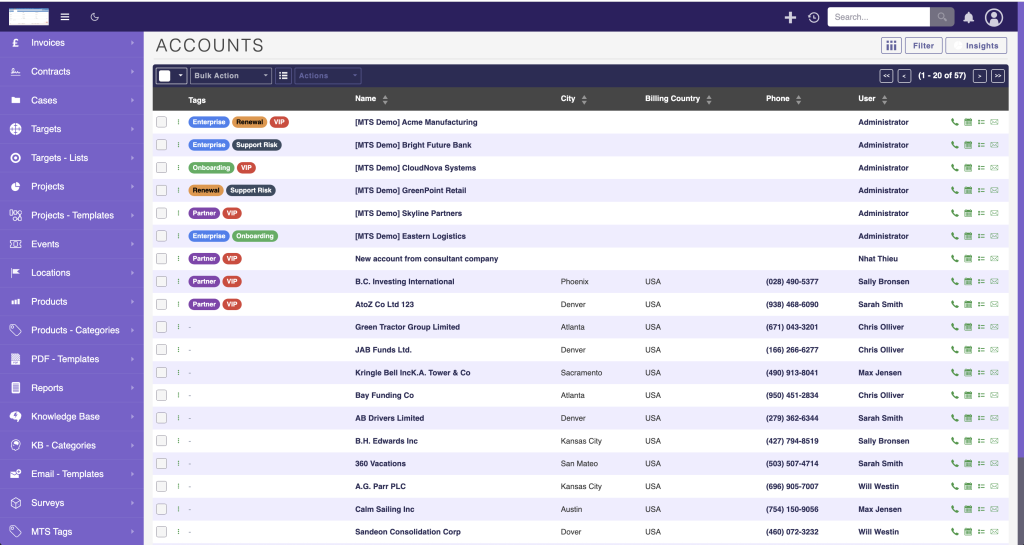
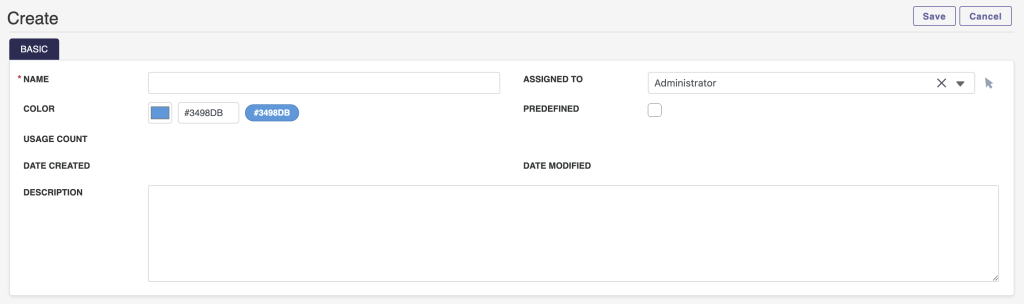
2. Color-Coded Visuals: Visual cues speed up user recognition. Premium plugins allow admins to assign distinct colors to specific tags, making high-priority records stand out instantly in a List View.
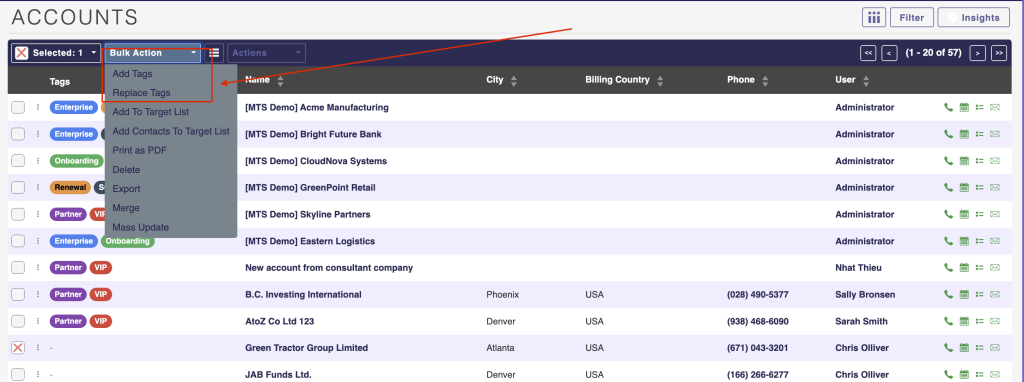
3. Bulk Tagging Operations: For large-scale data migrations or campaign updates, users must be able to select multiple records simultaneously and apply or remove tags in a single click.
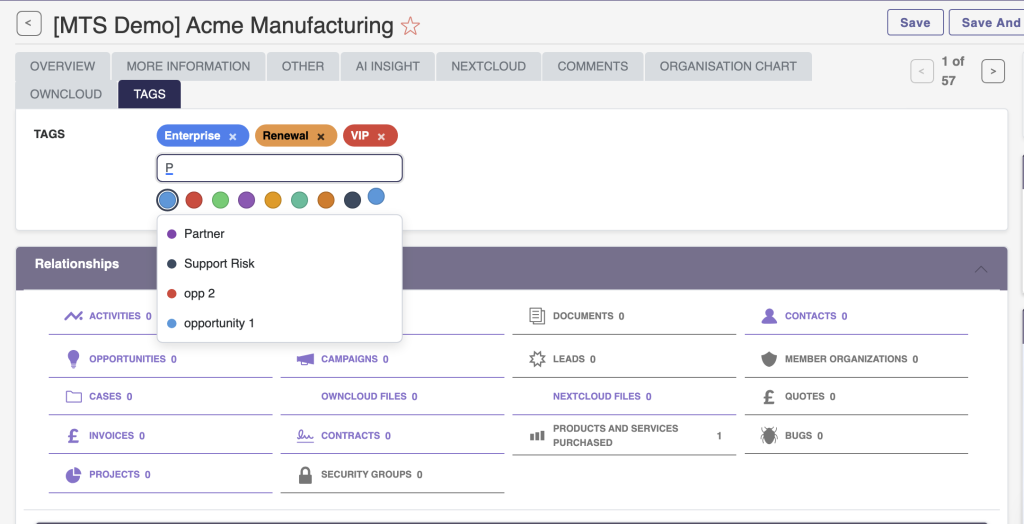
4. Auto-Suggest and Typeahead: To maintain data integrity, the system should instantly suggest existing tags as users type, drastically reducing the creation of duplicate or misspelled tags.
Elevate Your CRM with the MTS Tag Field
Why Choose MTS Tag Field?
Designed specifically for seamless integration and top-tier user experience, this plugin addresses the common friction points of native data categorization.
* Intuitive UI/UX: It introduces a highly responsive, modern interface for applying tags on both the Edit and Detail views, reducing the clicks required to manage record metadata.
* Broad Compatibility: Engineered for modern architecture, it offers flawless SuiteCRM 8 tag management, ensuring that your tagging workflows remain uninterrupted during system upgrades.
* Advanced Customization: The plugin allows for deep SuiteCRM tags customization, granting administrators strict control over who can create new tags and who can only select from predefined lists.
By leveraging the MTS Tag Field, organizations ensure their data remains highly structured, easily searchable, and primed for advanced reporting.
Best Practices for SuiteCRM 8 Tag Management
Establish Naming Conventions
Create a standardized dictionary for your tags. Decide whether your organization will use CamelCase, kebab-case, or spaces (e.g., TradeShow_2026 vs Trade Show 2026). Uniformity is critical for accurate reporting.
Restrict Tag Creation
Allowing every user to create new tags on the fly is a recipe for database bloat. Utilize MTS SuiteCRM development expertise to configure user roles so that only designated managers or administrators can create new global tags, while standard users can only apply existing ones.
Conduct Regular Audits
Schedule quarterly reviews of your tag database. Identify orphaned tags (tags with zero associated records) and merge duplicated tags (e.g., merging CEO and C.E.O.). Keeping the tag list lean ensures the auto-suggest feature remains fast and relevant.
✦ Key Takeaways
- ✓ SuiteCRM Tag Management provides a flexible, cross-module alternative to rigid custom fields for categorizing CRM data.
- ✓ Implementing color-coded visuals and bulk-action capabilities accelerates data processing for end-users.
- ✓ The MTS Tag Field plugin significantly enhances the native UI and administrative control over tag creation.
- ✓ Establishing strict naming conventions and conducting regular tag database audits are crucial to preventing CRM bloat.
Conclusion
Mastering **SuiteCRM Tag Management** is a fundamental step toward achieving a clean, highly actionable CRM database. By moving away from restrictive custom fields and embracing dynamic, cross-module tagging, your sales and marketing teams can navigate data with unprecedented speed and accuracy. Remember that the technology must be paired with strict naming conventions and regular audits to prevent data bloat. If you are looking to upgrade your system’s native capabilities, exploring professional tools like the [MTS Tag Field](https://store.mientrungsoft.com/mts-tag-field/) will provide the advanced control and intuitive interface your enterprise needs. Partner with Mien Trung Soft today to optimize your CRM architecture and empower your team with tailored, high-performance solutions.
Frequently Asked Questions (FAQ)
What is the primary advantage of using tags over custom dropdown fields in SuiteCRM?
Tags offer cross-module flexibility and dynamic assignment. Unlike a dropdown field which is confined to a single module and requires an administrator to update its values, tags can be fluidly applied across Accounts, Contacts, and Opportunities without altering the core database structure.
Is the MTS Tag Field compatible with the latest SuiteCRM architectures?
Yes, professional extensions like the MTS Tag Field are engineered specifically for modern frameworks, providing robust and seamless SuiteCRM 8 tag management capabilities.
How can an enterprise prevent tag duplication and database bloat?
Enterprises should enforce strict role-based permissions that restrict tag creation to administrators only. Additionally, utilizing plugins with auto-suggest functionality and conducting quarterly tag audits will keep the CRM data clean and standardized.

Nhat Thieu
CRM · HRM · Custom SoftwareCRM Solution Architect & Developer specializing in open-source CRM/HRM customization, system integration, custom software and AI.