Configure a SuiteCRM Group Layout for Role-Based Views
⚡ Quick Summary / Key Takeaway
SuiteCRM Group Layout: A SuiteCRM Group Layout empowers administrators to assign customized module interfaces—including detail, edit, and list views—to specific security groups. By dynamically adjusting the CRM interface based on user roles, organizations can hide irrelevant fields, simplify data entry, and improve overall system adoption without writing custom code.
Table of Contents
As enterprise organizations scale, a one-size-fits-all CRM interface quickly becomes a liability. Sales representatives need immediate access to pipeline stages, while customer support teams rely on ticketing history and SLAs. Forcing every department to navigate the exact same cluttered screen leads to data entry errors, frustration, and poor user adoption. By implementing a dedicated SuiteCRM Group Layout, administrators can transform the user experience, ensuring that every team member sees exactly the data they need—and nothing they don’t. At Mien Trung Soft, we specialize in advanced open-source CRM architecture, and in this guide, we will explore how to dynamically tailor module views based on user security groups.
The Challenge of Generic CRM Interfaces
What is the MTS SuiteCRM Group Layout Manager?
Key Business Benefits and Capabilities
Comprehensive Multi-View Customization
Administrators gain granular control over every aspect of the module interface:
- ✦ Detail View: Display only the panels and fields critical to the specific department.
- ✦ Edit View: Condense data entry forms to capture essential information quickly, minimizing user friction.
- ✦ List View: Refine visible columns to highlight KPIs relevant to the assigned Security Group.
- ✦ Search & Filters: Optimize search panels so teams can locate essential records without navigating through irrelevant parameters.
- ✦ Popups: Streamline the record picker when linking related data.
Seamless Studio Integration
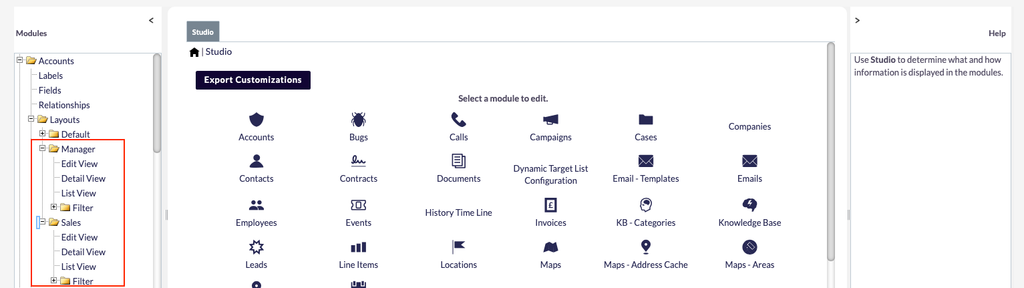
There is no need for complex developer interventions. The SuiteCRM 8 layout manager integrates flawlessly with the native Studio environment. Administrators can utilize standard drag-and-drop mechanics to build out the SuiteCRM Group Layout, saving changes directly to the target Security Group.
Rapid Deployment Tools
To accelerate implementation, the tool features a one-click cloning mechanism. Administrators can duplicate an existing module layout or base default settings to quickly establish a new SuiteCRM security group customization, drastically reducing setup time.
Step-by-Step Configuration Guide
1. Activating the Plugin
After uploading the package via the native Module Loader, navigate to the Admin panel and locate the Group Layouts License section. Authenticate your license key obtained from the SuiteCRM Store to enable the management capabilities.
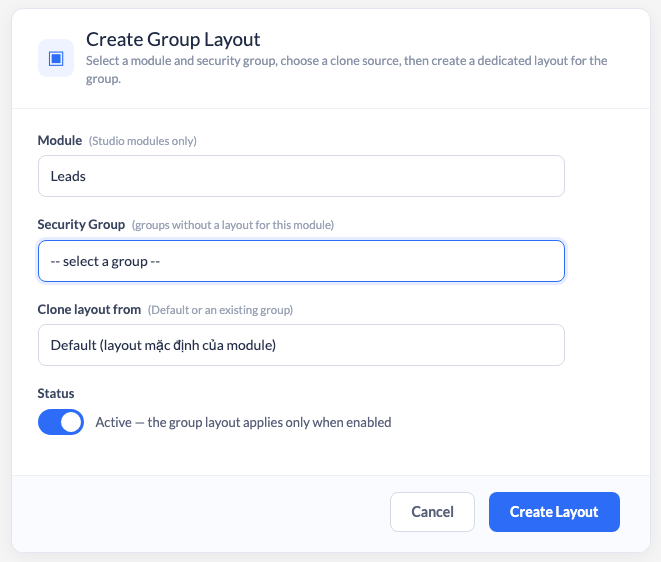
2. Creating a Layout Mapping
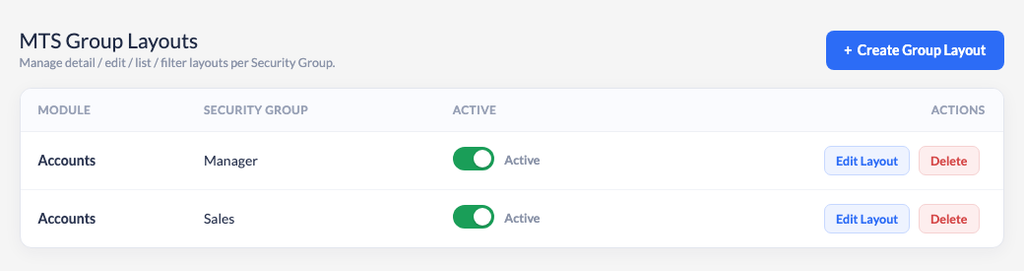
Access the MTS Group Layouts screen from the Admin dashboard. Click on the button to create a new layout mapping. You will be prompted to select the target module and the specific Security Group you wish to customize. You can opt to clone the default layout to serve as your foundational template.
3. Customizing via Studio
Once the mapping is active, click the edit action on your new layout row. The system will seamlessly redirect you to the native Studio interface, pre-loaded into your newly created security group context. From here, modify the Detail, Edit, List, and Search views as you normally would. Click Save & Deploy to instantly apply the changes to the assigned users.
4. Layout Management
The management grid allows you to easily toggle layouts on or off. Deactivating a layout instantly reverts the affected Security Group back to the default module view without permanently deleting your tailored configuration.
Best Practices for Role-Based Views
✦ Key Takeaways
- ✓ A generic CRM layout causes user confusion, data entry errors, and lower overall system adoption.
- ✓ A SuiteCRM Group Layout allows admins to assign completely distinct Detail, Edit, and List views to specific Security Groups.
- ✓ MTS Group Layouts integrates seamlessly with the native Studio, requiring absolutely no custom code.
- ✓ The 100% upgrade-safe architecture ensures that role-based layouts survive future core platform updates.
Conclusion
A tailored CRM interface is no longer a luxury; it is a critical requirement for user adoption and enterprise efficiency. By deploying a SuiteCRM Group Layout, you can eliminate interface clutter and deliver a highly focused workspace for every department in your organization. At Mien Trung Soft, we build powerful, upgrade-safe architectures that allow your CRM to adapt to your specific business workflows. Contact our consulting team today to discover how we can transform your open-source CRM strategy.
Frequently Asked Questions (FAQ)
Which layout applies if a user is in multiple Security Groups?
The system determines the layout based on the user’s primary Security Group. It is highly recommended to strictly define primary groups for all users to ensure the correct layout is rendered consistently.
What happens if a user’s group does not have a customized layout?
If a user is not part of a group with an active customized view, the engine gracefully falls back and renders the standard, default module layout.
Does the MTS Group Layout plugin modify core SuiteCRM files?
No. The plugin utilizes a 100% upgrade-safe architecture. It leverages standard SuiteCRM 8 extension frameworks, ensuring that your core files are untouched and updates perform smoothly.

Nhat Thieu
CRM · HRM · Custom SoftwareCRM Solution Architect & Developer specializing in open-source CRM/HRM customization, system integration, custom software and AI.