SuiteCRM Multiple Assigned Users: Configuration & Workflow Guide
⚡ Quick Summary / Key Takeaway
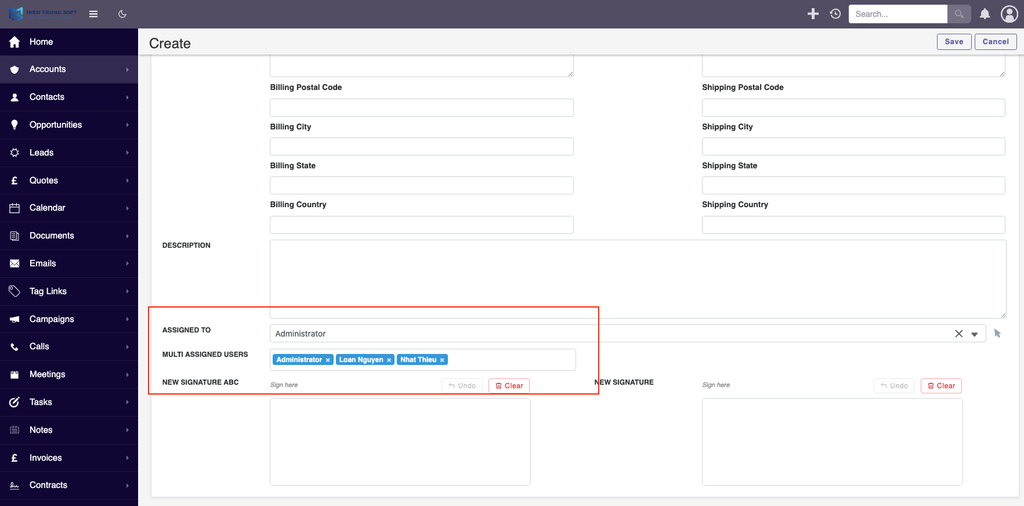
SuiteCRM Multiple Assigned Users: SuiteCRM Multiple Assigned Users allows organizations to assign a single CRM record to several team members simultaneously. By utilizing an ‘Additional Assigned Users’ field, businesses can trigger notifications and apply record-level permissions for multiple stakeholders, ensuring collaborative sales and support workflows without restricting access to just one owner.
Table of Contents
In standard CRM environments, a record is typically owned by a single individual. However, modern business processes rarely operate in silos. Whether you are managing complex enterprise accounts, running cross-functional marketing campaigns, or handling tiered support tickets, restricting record ownership to one person can create severe bottlenecks. Implementing **SuiteCRM Multiple Assigned Users** transforms your platform from a rigid database into a collaborative workspace. This guide explores how to extend SuiteCRM’s architecture to support shared record ownership, ensuring that all relevant team members have the visibility, notifications, and permissions they need to drive business success.
Why Enterprise Teams Need Multiple Assigned Users
The Co-Ownership Advantage
When dealing with high-value enterprise clients, an Account often requires the combined efforts of an Account Executive, a Solutions Engineer, and a Customer Success Manager. By enabling SuiteCRM Multiple Assigned Users, organizations can accurately reflect these real-world teams within the system. This shared access ensures that if the primary owner is unavailable, co-assigned team members can step in without hitting permission walls, maintaining continuous service delivery, rapid response times, and impeccable data accuracy.
Core Mechanisms of Multiple User Assignment
Seamless System Integration
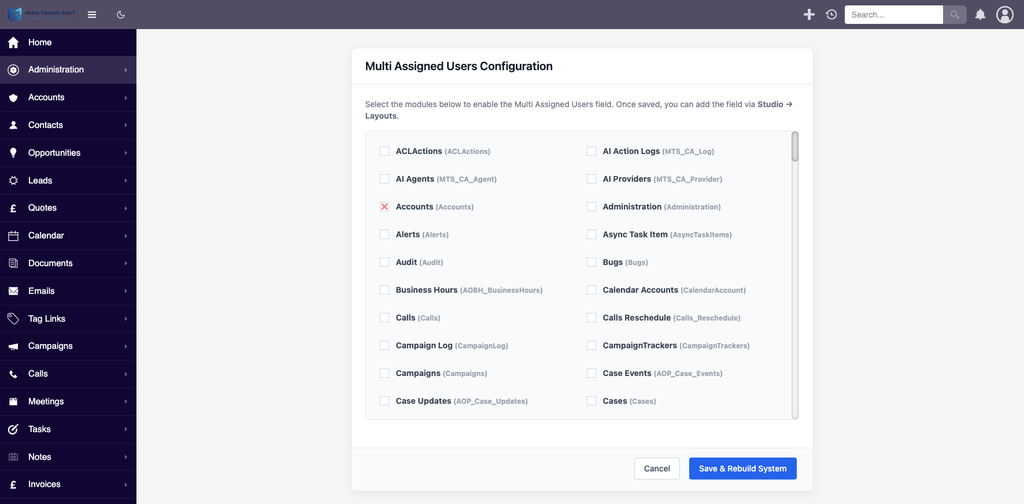
Once configured, this secondary field works seamlessly with native SuiteCRM functionalities. When users are added to a record via this expanded field, they receive the exact same assignment notifications as the primary user. Furthermore, these co-assigned records will automatically populate on their personalized dashboards and module list views. This ensures that adding multiple assigned users is not just a decorative tag, but a fully functional assignment that actively drives daily workflow engagement and task management.
Navigating Security Groups and Role Permissions
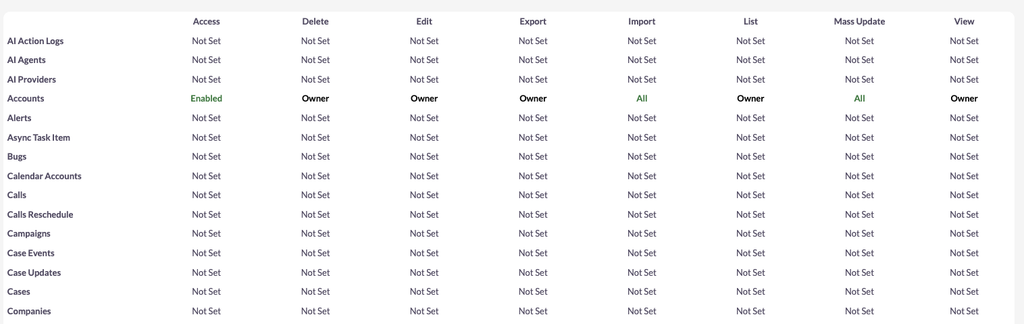
Resolving Permission Conflicts
SuiteCRM utilizes a strict, fail-safe security architecture. When a user is assigned to a record, their ability to view, edit, or delete that data fundamentally depends on their assigned Roles. If a user inherits multiple roles—perhaps one directly and another through a Security Group membership—SuiteCRM defaults to the most restrictive setting. For instance, if Role A allows record deletion but Role B prohibits it, the user will be blocked from deleting the record, even if they are listed as an additional assigned user. Administrators must carefully audit their matrix of Security Groups to ensure that co-assigned team members have the necessary rights to collaborate without compromising overall organizational data security.
Customizing Workflows with Mien Trung Soft
As a premier open-source CRM development agency, Mien Trung Soft specializes in deep SuiteCRM customization. Our Senior CRM Technical Architects can tailor the SuiteCRM Multiple Assigned Users architecture to perfectly fit your operational logic. Whether you need automated round-robin assignments for expanding support teams, dynamic permission updates based on fluctuating deal stages, or custom dashboard dashlets to visualize shared workloads, our team delivers robust, scalable solutions that maximize your CRM investment.
✦ Key Takeaways
- ✓ SuiteCRM Multiple Assigned Users enables critical co-ownership of CRM records for collaborative teams.
- ✓ The ‘Additional Assigned Users’ functionality flawlessly triggers standard system notifications and dashboard updates.
- ✓ SuiteCRM enforces the most restrictive permission settings when users inherit conflicting roles.
- ✓ Mien Trung Soft provides advanced custom development to tailor user assignment logic for complex enterprise workflows.
Conclusion
Transitioning from a single-owner model to a collaborative CRM environment is a game-changer for enterprise productivity. By implementing SuiteCRM Multiple Assigned Users, you eliminate bottlenecks, improve cross-departmental visibility, and ensure your team can act on data simultaneously. To guarantee your security models and workflows are properly aligned with this feature, consult with the technical experts at Mien Trung Soft for a seamless, customized deployment.
Frequently Asked Questions (FAQ)
How does SuiteCRM handle notifications for multiple assigned users?
When configured properly, any user added to the ‘Additional Assigned Users’ field receives standard system assignment notifications and workflow alerts, exactly like the primary assigned user.
Can I restrict permissions differently among the multiple assigned users?
Yes. While multiple users can be assigned to a single record, their individual capabilities (view, edit, delete) are strictly governed by their respective SuiteCRM Roles and Security Groups. The system applies the most restrictive setting if conflicting roles exist.
How can Mien Trung Soft help implement this for our enterprise?
Mien Trung Soft provides expert custom development to refine the SuiteCRM Multiple Assigned Users feature. We build tailored assignment logic, automated user routing, and custom API integrations to align perfectly with your unique business processes.

Nhat Thieu
CRM · HRM · Custom SoftwareCRM Solution Architect & Developer specializing in open-source CRM/HRM customization, system integration, custom software and AI.