If you are using SuiteCRM 8, you may have already discovered a major limitation in the sales workflow.
While modules like Quotes and Invoices support product rows, the Opportunities module still does not allow you to add line items.
For many businesses, this creates a serious problem.
Sales deals rarely consist of a single number. Instead, they usually include multiple products or services, quantities, pricing, and discounts.
So the real question many SuiteCRM users are asking today is:
How can we add line items to Opportunities in SuiteCRM 8?
In this article, we will explore the problem and explain a practical solution.
The Problem: Opportunities Only Store One Number
By default, the Opportunities module in SuiteCRM only allows you to store basic deal information such as:
- Opportunity Name
- Account
- Expected Revenue
- Sales Stage
This means the entire deal value is represented by just one field: Expected Revenue.
However, most sales processes look more like this:
| Product | Quantity | Price |
|---|---|---|
| CRM Implementation | 1 | $4,000 |
| Custom Development | 30 hours | $90/hour |
| Maintenance Package | 12 months | $60/month |
Without line items, it becomes difficult for sales teams to:
- structure deals properly
- calculate totals automatically
- manage multiple services or products
- convert opportunities into quotes efficiently
As a result, many companies end up managing deal details in Excel spreadsheets, which defeats the purpose of using a CRM.
Why SuiteCRM 8 Still Doesn’t Support This
SuiteCRM historically implemented product rows using the AOS (Advanced Open Sales) system.
This system works well in modules like:
- Quotes
- Invoices
- Contracts
But when SuiteCRM 8 introduced its new modern architecture, the line item component was never fully redesigned.
This leaves a gap in the sales workflow.
Currently, SuiteCRM 8 does not provide a native way to:
- add product rows to Opportunities
- calculate totals automatically
- structure deals before generating quotes
This is why many companies start searching for SuiteCRM 8 plugins that can extend this functionality.
If you are exploring extensions available for the platform, you can also check this curated collection of tools:
This page lists useful SuiteCRM 8 plugins and extensions that help expand the capabilities of the platform.
The Ideal CRM Sales Workflow
In a typical CRM workflow, the process should look like this:
1️⃣ Create an Opportunity
2️⃣ Add products or services the customer is interested in
3️⃣ Calculate the estimated deal value automatically
4️⃣ Convert the Opportunity into a Quote
This approach allows sales teams to:
- forecast revenue more accurately
- define the structure of deals early
- prepare proposals faster
Without line items, however, Opportunities cannot support this workflow effectively.
A Solution: Adding Line Items to Opportunities
To solve this problem, some SuiteCRM users choose to extend the system with plugins that enable line items directly inside the Opportunities module.
One example is the extension below:
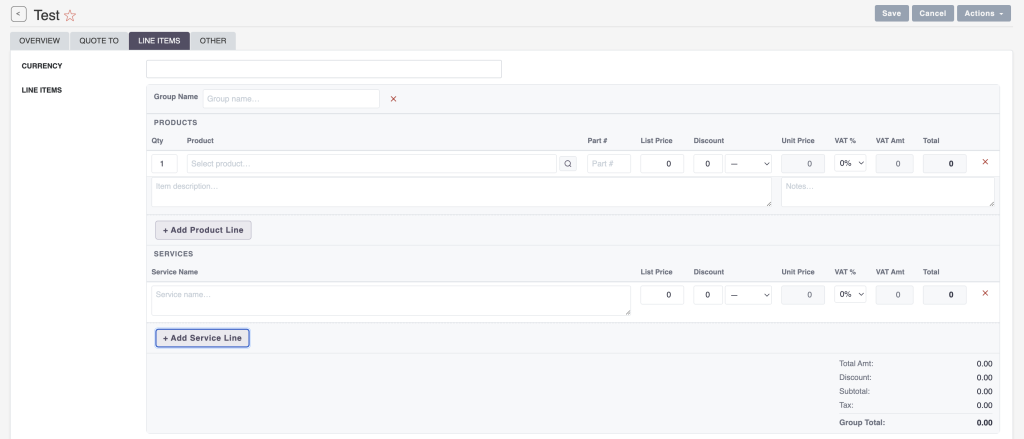
This plugin allows users to manage multiple product rows inside Opportunities, including:
✔ Products and services
✔ Quantities
✔ Unit prices
✔ Discounts
✔ Taxes
✔ Automatic totals
Instead of storing deal value as a single number, Opportunities become fully structured sales records.
Why This Matters for Sales Teams
When Opportunities support line items, the CRM becomes significantly more powerful.
Sales teams can:
- define deal structure before sending proposals
- estimate project scope more accurately
- manage multiple services in a single deal
- convert opportunities into quotes faster
For service companies, agencies, and software vendors, this functionality can dramatically improve how deals are managed inside SuiteCRM.
The Growing Demand for SuiteCRM 8 Plugins
As SuiteCRM 8 continues to evolve, more businesses are searching for plugins that extend its core functionality.
Common areas where users look for extensions include:
- sales automation
- document generation
- reporting improvements
- product management
If you want to explore available tools, the SuiteCRM 8 plugin directory here is a useful starting point:
👉 https://mientrungsoft.com/suitecrm-8-plugin-directory/
This collection helps users discover extensions that can unlock additional features within the SuiteCRM ecosystem.
Final Thoughts
SuiteCRM is a powerful open-source CRM, but some features that businesses rely on are still missing in the standard installation.
One of the most requested improvements is the ability to add line items directly to Opportunities.
With proper line item support, Opportunities can evolve from simple revenue estimates into fully structured sales deals.
This enables better forecasting, faster quote generation, and more efficient sales processes.
For companies that rely heavily on structured product or service deals, extending SuiteCRM with the right plugin can significantly improve the entire CRM workflow.