Track Your Time in SuiteCRM with MTS Timesheet
If your team spends most of the day working in SuiteCRM, you probably ask questions like:
- How much time do we actually spend on each project, ticket or opportunity?
- Which customers consume the most support time?
- Are we logging enough billable hours to match our invoices?
Spreadsheets and manual notes are easy to start with, but they quickly become messy and disconnected from the CRM.
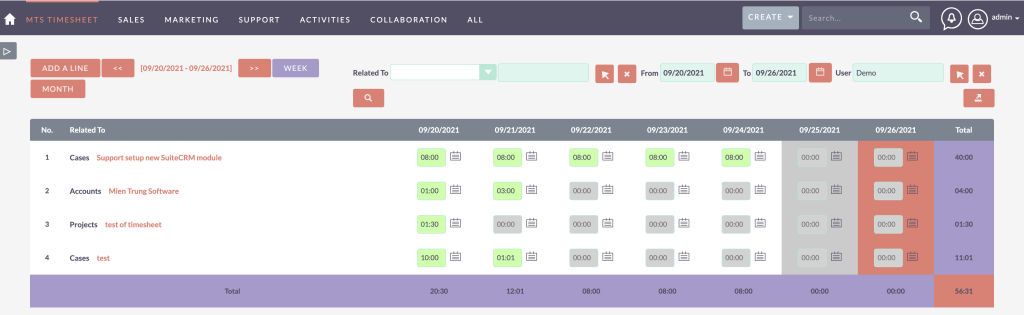
MTS Timesheet is a dedicated SuiteCRM timesheet add-on that solves this by bringing time tracking into SuiteCRM itself. Your users log time against any record, and managers get clear, exportable timesheets for reporting and billing.
What is MTS Timesheet?
MTS Timesheet is an add-on for SuiteCRM that provides a visual timesheet board and a simple way to log working time directly onto CRM records:
- Track time against any module (Projects, Cases, Opportunities, custom modules, etc.)
- See how much time is spent on individual records
- Export timesheets by employee in PDF format for billing or reporting
It works with SuiteCRM versions 7.0.0 up to 8.8.1 and is licensed per instance with unlimited users, available as yearly or one-time plans.
Key features of MTS Timesheet
1. Log time against any SuiteCRM module
Unlike some tools that only work with Projects or Cases, MTS Timesheet lets you track time against any module in SuiteCRM:
- Accounts / Contacts
- Opportunities / Leads
- Cases / Tickets
- Projects / Tasks
- Custom modules (implementation, onboarding, services, etc.)
Users simply choose the related record and enter how much time they spent.
This gives you a consistent way to measure effort across all types of work.
2. Visual weekly/monthly timesheet board
At the heart of the add-on is a Timesheet board:
- Switch between weekly and monthly views
- Quickly jump to the previous or next week/month
- See where time is logged at a glance (per day, per record)
From the board, users can:
- Add new time entries
- Enter time spent in
HH:mmformat (e.g.08:00) - Add a description of what they did
This makes time entry faster and more visual than filling out raw lists.
3. Easy export to PDF timesheets
For billing, payroll, or reporting, you often need a formal timesheet.
MTS Timesheet allows you to:
- Filter the board (by employee, date range, module, etc.)
- Click Export PDF to generate a timesheet based on the current filter
That PDF can be:
- Sent to clients as part of an invoice backup
- Shared with managers for approval
- Archived for internal records
No need to copy data into Excel or external timesheet tools.
4. Accurate billable hours for clients
Because time entries are linked to CRM records, you can:
- See exactly how many hours were spent on each project, case, or account
- Separate billable vs non-billable work (depending on how you configure fields)
- Cross-check timesheets with invoices, especially if you use time-and-materials billing
This is particularly valuable for:
- Agencies and consulting firms
- IT and software service providers
- Support teams that bill by the hour or by case
5. Simple, user-friendly interface
MTS Timesheet is designed so that:
- Users only need to know which record they worked on and how long
- Navigation is straightforward: add entry → pick related record → log time → save
- There’s no separate login or external system – everything is inside SuiteCRM
A tool that is easy to use is much more likely to be used consistently.
How MTS Timesheet works – typical workflow
Here’s what a normal day might look like with MTS Timesheet in SuiteCRM:
- User works on a customer task
They handle a support Case, work on a Project Task, or prepare a proposal for an Opportunity. - Log time on the Timesheet board
- Open MTS Timesheet from the menu
- Go to the week view
- Click “Add new record to board”
- Select the related module and record (e.g. Project Task X)
- Enter the time spent (e.g.
02:30) - Write a short description: “Bug fixing and testing for feature Y”
- Repeat throughout the day or week
At the end of the day/week, the user can quickly review all their entries on the board. - Manager/export timesheets
- Filter by user and date range
- Click Export PDF to generate a timesheet report
- Use it for invoicing clients or reviewing internal workload
Because everything is connected to SuiteCRM records, you can always trace back:
“This 3 hours was spent on that specific Project / Case / Opportunity.”
Benefits of using a SuiteCRM timesheet instead of external tools
One system instead of many
With MTS Timesheet:
- Staff log time where they already work – in SuiteCRM
- You don’t have to sync contacts, projects or tickets into another system
- Time, activities, and customer data stay in one database
Better reporting and analysis
Since timesheet entries are related to CRM data, you can:
- Build SuiteCRM reports showing hours per project, customer, or service type
- Compare time spent vs revenue for each client
- Identify which types of work consume the most effort
You gain insights that would be difficult if time tracking lived in a completely separate tool.
Lower cost and easier maintenance
Instead of paying for a separate timesheet SaaS product per user:
- MTS Timesheet is licensed per SuiteCRM instance with unlimited users
- You reuse your existing SuiteCRM infrastructure, backups and security model
This often results in lower long-term cost and simpler admin.
Who should consider MTS Timesheet?
MTS Timesheet is a strong fit if:
- Your team already spends most of their day in SuiteCRM
- You bill clients based on time and materials, or need time tracking for internal cost allocation
- You want a lightweight, visual timesheet that is tightly integrated with CRM data
- You prefer a one-time or yearly add-on license over per-user SaaS subscription
It works well for:
- Agencies & consulting companies
- IT service providers & helpdesk teams
- Professional services (accounting, legal, engineering, etc.)
- Any organization that wants more visibility into how time is spent on CRM work
Track time where work actually happens – in SuiteCRM
Instead of juggling spreadsheets and external timesheet tools, you can:
- Add a Timesheet board directly into SuiteCRM
- Log time against projects, tickets, opportunities and any other records
- Export PDF timesheets for billing and reporting
- Get a clear picture of where your team’s hours really go
MTS Timesheet turns SuiteCRM into a practical, easy-to-use time tracking solution – without forcing your users to learn yet another system.
If you’d like help planning or implementing MTS Timesheet in your SuiteCRM instance, we can assist with installation, configuration and aligning the timesheet setup with your current processes.