SuiteCRM Field Level Security: How to Hide or Lock Fields by Role in SuiteCRM 8
SuiteCRM field level security is one of the most requested features in the SuiteCRM community, and one of the most misunderstood. Roles decide which modules a user can open. Security Groups decide which records they can see. But neither decides which fields inside a record a user may read or change.
This guide explains what SuiteCRM does and does not offer out of the box, how to hide a field or make it read-only by role in SuiteCRM 8 with custom code, where that approach usually leaks, and when a ready-made field level access control plugin is the faster and safer choice.
Does SuiteCRM Have Field Level Security?
Not natively. SuiteCRM’s access model has two built-in layers, and field-level control is the missing third one:
| Layer | Answers the question | Built into SuiteCRM? |
|---|---|---|
| Roles (Role Management) | Can this user list, view, edit, delete or export records of this module? | Yes |
| Security Groups | Which records can this user access? | Yes |
| Field level access | Which fields inside a record can this user see or edit? | No, requires custom code or a plugin |
That gap is easy to hit. A sales rep may need to work on Accounts every day, yet should not see annual revenue, margins or cost prices. A junior agent may need to update Cases but must not reassign them. With module-level roles alone, the only options are “full access” or “no access” to the whole module.
Common Reasons to Restrict Fields by Role
- Confidential numbers: revenue, margin, cost price, commission or credit limit visible only to managers or finance.
- Process control: Assigned to, Sales Stage, Amount or Status read-only for some roles so data cannot be changed outside the agreed process.
- Personal data: birthdate, national ID or bank details limited to HR or accounting, supporting GDPR-style data minimisation.
- Cleaner screens: fewer irrelevant fields for each team, which also reduces input errors.
Option 1: Hide or Lock Fields with Custom Code (SuiteCRM 7)
In SuiteCRM 7, developers usually combine three techniques: custom editviewdefs.php / detailviewdefs.php with role checks in Smarty or JavaScript, an after_retrieve logic hook to blank out values, and a before_save hook to stop changes. It works, but every field and every view is hand-coded, and it is easy to forget list views, subpanels, popups, mass update or exports.
Option 2: Field Level Security in SuiteCRM 8 with Custom Code
SuiteCRM 8 changed the picture. The UI is an Angular application fed by a GraphQL API, and Smarty templates no longer render record views. A proper implementation now needs several pieces, all of which can be built without touching core:
- View metadata: a Symfony extension in
extensions/<yourExtension>/backend/implementing the view definition and field definition mappers, so hidden fields are removed from list, record, subpanel, filter and mass update definitions, and read-only fields are flagged as such for the current user. - Data: strip values of hidden fields before records leave the server. Hiding an input in Angular is not security: the values are still visible in the browser’s network tab.
- Writes: a
before_savelogic hook that restores protected fields fromfetched_row. This single layer covers record edit, inline edit, mass update, import and the V8 REST API. - Admin UI and storage: somewhere to define which role gets which access on which field, instead of hard-coding role names.
Example: make one field read-only for everyone except a role
The write-protection layer is the easiest to start with. This example, for SuiteCRM 8 (legacy layer), keeps Annual Revenue on Accounts unchanged for everyone except users with the Sales Manager role:
<?php
// public/legacy/custom/Extension/modules/Accounts/Ext/LogicHooks/protect_revenue.php
$hook_array['before_save'][] = [
    90,
    'Keep annual_revenue read-only for non-managers',
    'custom/modules/Accounts/ProtectRevenueHook.php',
    'ProtectRevenueHook',
    'beforeSave',
];
<?php
// public/legacy/custom/modules/Accounts/ProtectRevenueHook.php
class ProtectRevenueHook
{
public function beforeSave($bean, $event, $arguments): void
{
global $current_user;
// New records and admins are not restricted in this example
if ($current_user->isAdmin() || empty($bean->fetched_row)) {
return;
}
$roles = ACLRole::getUserRoleNames($current_user->id);
if (!in_array('Sales Manager', $roles, true)) {
// Restore the stored value, whatever the UI, import or API sent
$bean->annual_revenue = $bean->fetched_row['annual_revenue'];
}
}
}Run Admin → Repair → Quick Repair and Rebuild afterwards. Note what this does not do: the field is still displayed as editable, its value is still returned by the API, and the rule covers one field, one module and one hard-coded role name.
Where DIY field security usually leaks
- Values hidden in the UI but still returned by GraphQL or the V8 API.
- Fields protected in the record view but editable through inline edit, mass update or import.
- Restricted fields still available in Reports, list view columns, filters or CSV export.
- Users with several roles, roles inherited through Security Groups, and administrators who need a bypass.
- View metadata cached at login in SuiteCRM 8, so rule changes appear to “not work” until users reload.
- Hard-coded role names that break when an admin renames a role.
Option 3: Use a Field Level Access Control Plugin for SuiteCRM 8
If you need more than one or two fields, a plugin is usually cheaper than building and maintaining all of the layers above. The best-known field-level add-on on the official SuiteCRM Store supports SuiteCRM 7 only, which is why we built MTS Field Access Control natively for SuiteCRM 8.
It covers every layer described above: view metadata, data returned by the API, and all save paths. Setup takes a few minutes:
- Install the package with Admin → Module Loader and run Quick Repair and Rebuild.
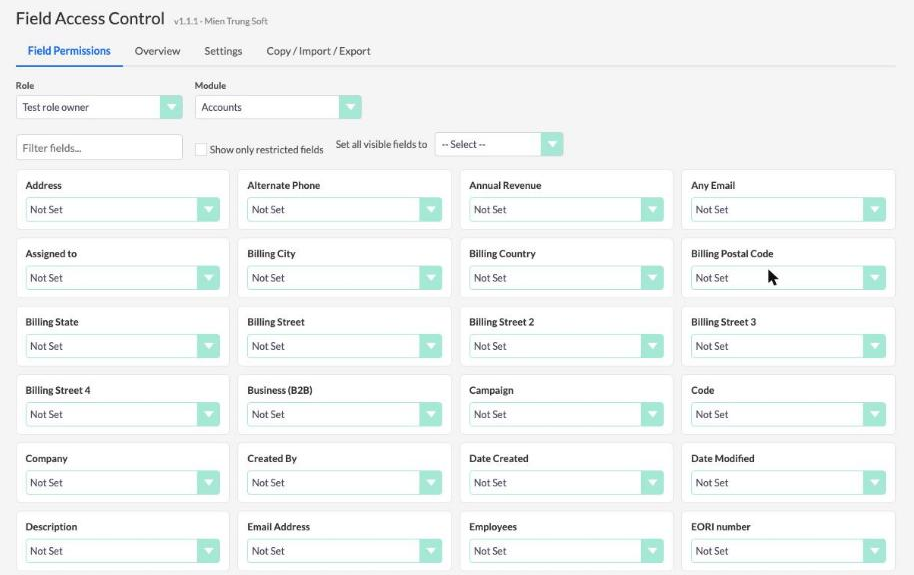
- Open Admin → Field Access Control, choose a role and a module.
- Set the access level for each field in the grid, then click Save.
Each field can get one of six access levels:
| Access level | Effect for users in the role |
|---|---|
| Not Set | No restriction from the plugin |
| Read/Write | See and edit |
| Read/Owner Write | See; only the record owner can edit |
| Read Only | See, never edit |
| Owner Read/Owner Write | Only the record owner can see and edit |
| None | Hidden everywhere, value not returned |
Settings let you include roles inherited through Security Groups, choose the most permissive or most restrictive rule for users with several roles, exempt or include administrators, and hide restricted fields in Reports and CSV exports. Rules can be copied between roles and exported as JSON to move them from staging to production.
Field Level Security Checklist for SuiteCRM 8
Whichever route you take, check these before going live:
- Hidden fields are absent from list view, record view, subpanels, filters and mass update.
- Hidden values are not present in API responses (check the browser’s network tab).
- Read-only fields cannot be changed by inline edit, mass update, import or the V8 API.
- Reports and CSV exports respect the same rules.
- Users with multiple roles get the result you expect.
- Workflows and scheduled jobs can still update protected fields if your processes depend on it.
- You tested as a real non-admin user, not as admin.
FAQ
Can SuiteCRM Studio make a field read-only for one role?
No. Studio changes the layout for everyone. It cannot apply different read or edit rights per role. Separate layouts per Security Group are possible with a plugin such as SuiteCRM Group Layout, but layouts alone do not protect data in the API.
Is hiding a field in the SuiteCRM 8 UI enough?
No. If the value is still sent to the browser, anyone can read it in the developer tools. Real field level security removes the value on the server and blocks writes on save.
Does field level access control replace Roles and Security Groups?
No, it complements them. Roles still decide module access and Security Groups still decide record access; field rules then narrow down what users see inside the records they can open.
👉 Get MTS Field Access Control for SuiteCRM 8 or contact us if you need field-level rules tailored to your own modules.
Related: 15 Best SuiteCRM Plugins in 2026 · Upgrade SuiteCRM 7 to SuiteCRM 8
Mien Trung Soft — SuiteCRM plugin development and customization since 2017 · 40+ add-ons on the SuiteCRM Store.

Nhat Thieu
CRM · HRM · Custom SoftwareCRM Solution Architect & Developer specializing in open-source CRM/HRM customization, system integration, custom software and AI.