Email is still one of the most important channels in customer relationship management. But writing good emails takes time:
- You rewrite the same follow-ups over and over
- Long email threads are hard to digest
- It’s not easy to find the right tone for each client
- Subject lines don’t always get the open rates you want
MTS AI Email Writer for SuiteCRM solves this by bringing AI-powered writing assistance directly into your CRM.
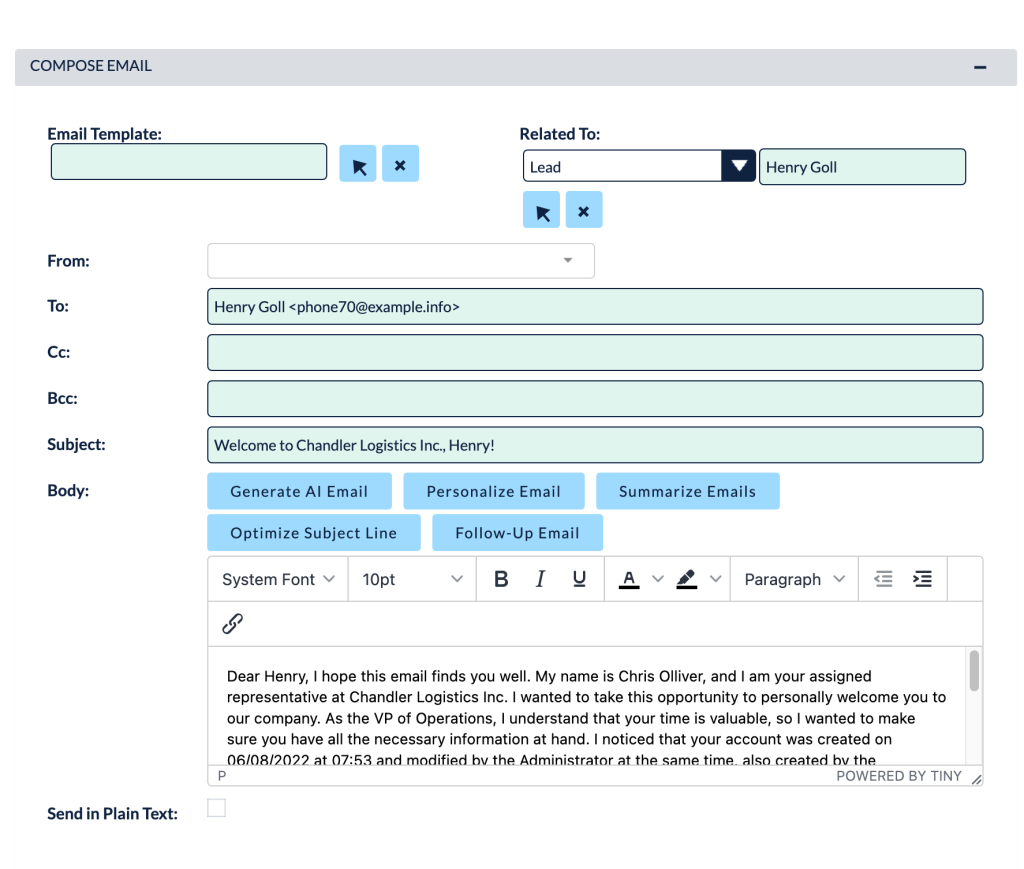
This add-on uses advanced AI (via OpenAI’s API) to help you generate, personalize, summarize and optimize emails without leaving SuiteCRM.
What is MTS AI Email Writer?
MTS AI Email Writer is a SuiteCRM add-on that integrates AI text generation into the standard email compose screen. With a few clicks you can:
- Generate complete email drafts
- Personalize content based on CRM data
- Summarize long conversations
- Create follow-up emails
- Optimize subject lines
It supports SuiteCRM from 7.0.0 up to 8.x and is licensed per instance with unlimited users, available on a yearly plan and backed by a 30-day money-back guarantee.
Key features of AI Email Writer for SuiteCRM
1. Generate AI-powered email drafts
From the SuiteCRM email compose window, you can:
- Type a short prompt or just the email subject, then
- Click Generate AI Email to let the plugin create a full, context-aware email draft.
Whether it’s a follow-up, a proposal, or a simple thank-you message, the AI gives you a solid starting point that you can tweak instead of writing from scratch.
2. Personalized email content based on CRM data
Personalization is crucial for good engagement. AI Email Writer can:
- Use the “Related To” record (Account, Contact, Lead, etc.) you select
- Display key info and generate a prompt that incorporates that data
- Produce a personalized email mentioning the customer’s name, company and context.
So every email feels like it was written for that specific person—not a generic template.
3. Summarize long email threads
Reading through long email chains is time-consuming. With AI Email Writer you can:
- Load the email history for the recipients
- Ask the AI to summarize the conversation into a short, clear overview
You instantly understand what happened so far and can respond more intelligently, without scrolling through dozens of messages.
4. Generate follow-up emails automatically
Following up consistently is one of the easiest ways to increase sales—but also one of the easiest things to forget.
AI Email Writer can:
- Look at previous messages in the thread
- Use your prompt (e.g. “friendly follow-up after demo”)
- Generate a follow-up email that keeps the tone and context of the conversation.
This makes it simple to maintain momentum with leads and customers.
5. Optimize subject lines for better open rates
The subject line is often the difference between “opened” and “ignored”.
The plugin lets you:
- Write or generate your email body
- Click Optimize Subject Line to have the AI propose subject lines based on the content.
You can pick the one that best matches your tone and objectives (more opens, more replies, more clicks).
6. Seamless integration into SuiteCRM
AI Email Writer is designed to feel like part of SuiteCRM:
- Appears in the standard email compose interface
- Uses your existing email accounts and templates
- Admins configure the OpenAI API key and model from a dedicated configuration panel in Admin, then users can start using it immediately.
No separate login, no extra UI to learn.
How it works – from setup to daily use
Admin configuration (one-time)
- Install the add-on via Module Loader and run Quick Repair and Rebuild.
- In Admin, open MTS AI Email Writer License Configuration, enter your license key and validate.
- Go to MTS AI Email Writer Configuration:
- Enable the plugin
- Select or type the AI model
- Paste your OpenAI API key
- Save the settings
After that, AI Email Writer is ready for all CRM users.
Daily user workflow
- Open email compose in SuiteCRM (from a record or from the Emails module).
- Decide what you need:
- Quick AI draft from a subject or prompt
- Personalized email using the Related To record
- Summary + follow-up for existing threads
- Better subject line for an email you’ve written
- Click the corresponding AI button, review the generated content, and make any final edits.
Instead of staring at a blank screen, your team always starts from a good, AI-generated draft.
Benefits for your business
Save time and boost productivity
Sales, support and account managers can:
- Write more emails in less time
- Spend their energy on strategy and relationships, not wording
AI handles the initial draft; humans keep control over the final message.
Improve email quality and consistency
With AI assistance:
- Messages stay professional, clear and on-brand
- Subject lines become more compelling
- Tone is more consistent across team members
Over time, this leads to better engagement and fewer miscommunications.
Better customer experience
Personalized, well-structured emails make clients feel like you understand their situation and value their time. That’s hard to achieve with copy-paste templates, but easy when AI helps tailor each email in seconds.
Who should use AI Email Writer for SuiteCRM?
This plugin is a great fit if:
- Your team sends a lot of emails directly from SuiteCRM
- You want to move faster without sacrificing quality
- You’re curious about practical AI use cases that bring immediate, visible value
- You want a solution that supports both SuiteCRM 7 and SuiteCRM 8 in the same license.
It’s especially useful for:
- Sales teams doing outreach and follow-ups
- Account managers and customer success
- Support teams that need clear, friendly communication
- Marketing teams preparing campaigns or one-to-one nurturing emails
Bring AI into your SuiteCRM email workflow
Instead of treating AI as something separate, MTS AI Email Writer embeds it directly into the tool your team already uses every day: SuiteCRM.
With it you can:
- Generate complete email drafts in one click
- Personalize content using CRM data
- Summarize and follow up on complex threads
- Optimize subject lines for better results
If you want to see how AI Email Writer for SuiteCRM could work in your environment, we can help with installation, configuration, and best-practice training so your team gets the most out of AI from day one.