Data quality is one of the biggest challenges for long-term SuiteCRM users.
One of the most common causes of poor data quality comes from something very simple: free-text address fields.
An Address Dropdown Plugin for SuiteCRM solves this problem at its root by replacing free-text inputs with structured, standardized dropdown fields.
In this article, we’ll explain why this plugin is not just a “nice-to-have”, but a must-have upgrade for any serious SuiteCRM implementation.
The Problem with Free-Text Address Fields in SuiteCRM
By default, many SuiteCRM setups allow users to type addresses freely. Over time, this leads to:
- Different spellings for the same country or city
- Mixed formats (short names, full names, local language variants)
- Duplicate locations across records
- Inaccurate search and filtering
- Reports that cannot be trusted
At scale, these issues become costly and difficult to clean up.
What an Address Dropdown Plugin Changes
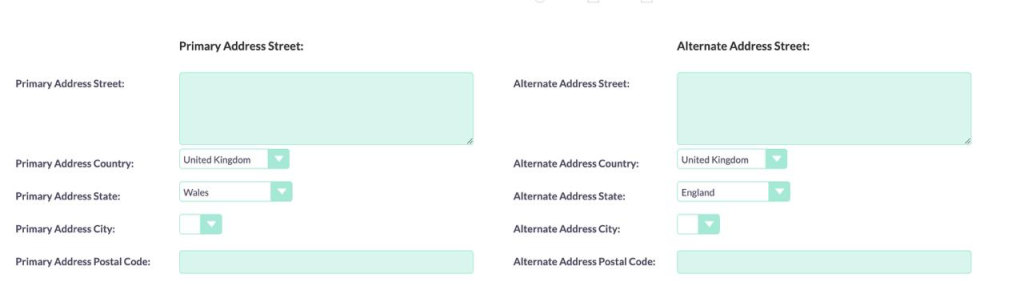
An Address Dropdown Plugin for SuiteCRM introduces structured fields such as:
- Country (dropdown)
- State / Region (dropdown)
- City (dropdown)
- Postal Code (controlled input)
Instead of typing, users select predefined values, ensuring consistency across the entire CRM.
Key Benefits of an Address Dropdown Plugin for SuiteCRM
1. Consistent Address Data Across All Modules
With a dropdown-based plugin:
- Every user selects from the same address values
- No spelling errors or variations
- Addresses remain consistent across Accounts, Contacts, Leads, and other modules
This consistency is essential for maintaining a professional CRM database.
2. Accurate Search, Filters, and Reports
Structured address data allows you to:
- Filter customers by country, state, or city reliably
- Build accurate regional sales and customer reports
- Segment data for marketing, sales, or compliance
Free-text address fields simply cannot support this level of accuracy.
3. Faster and More User-Friendly Data Entry
From a user experience perspective, dropdowns:
- Reduce typing effort
- Speed up form completion
- Prevent invalid or incomplete addresses
This is especially important for sales and support teams who work in SuiteCRM every day.
4. Reliable Automation and Workflow Logic
Many SuiteCRM workflows depend on address data, such as:
- Region-based task assignment
- Country-specific business rules
- Location-based notifications
An address dropdown plugin ensures that automations run correctly and consistently, without unexpected failures.
5. Ideal for International and EU-Based Businesses
For companies operating in multiple countries, structured address fields help with:
- VAT and tax logic
- Country-specific compliance requirements
- Clean and consistent invoice data
- Localization and reporting
This makes the plugin especially valuable for EU and global SuiteCRM users.
6. Long-Term Scalability and Lower Maintenance
Once the plugin is installed:
- New users automatically follow address standards
- No ongoing data cleanup is required
- CRM maintenance costs decrease over time
It’s a one-time improvement that delivers long-term value.
Why Use a Plugin Instead of Custom Fields?
A dedicated Address Dropdown Plugin for SuiteCRM offers advantages that ad-hoc custom fields cannot:
- Clean integration with SuiteCRM core modules
- Consistent behavior across EditView and DetailView
- Easy extension for new countries or regions
- Stable structure that survives SuiteCRM upgrades
In short: a plugin is safer, cleaner, and more scalable.
Upgrade Your SuiteCRM Address Fields Today
If your SuiteCRM still uses free-text address fields, now is the right time to upgrade.
With an Address Dropdown Plugin for SuiteCRM, you can:
- Improve data quality
- Enable accurate reporting
- Support reliable automation
- Prepare your CRM for future growth
📩 Contact Us via the Contact Form
Tell us:
- Your SuiteCRM version
- Which modules you want to upgrade
- Your country or regional requirements
We’ll help you implement the right address dropdown solution for your SuiteCRM.
Clean address data is the foundation of a powerful CRM.