If you use SuiteCRM to manage your customers and Nextcloud to store files, you probably know this pain:
- Important contracts and proposals are stored in folders on Nextcloud
- Customer data and activities are stored in SuiteCRM
- Your team constantly switches between browser tabs, copies links, and asks
“Where did we save that file for this client?”
Our SuiteCRM & Nextcloud integration connects these two worlds.
It lets your team:
- Access and manage Nextcloud files directly from SuiteCRM
- Organize documents automatically per Account / Opportunity / Project
- Keep customer information and related files in one place
So your CRM truly becomes the central hub for your business.
Why SuiteCRM and Nextcloud Are a Perfect Match
SuiteCRM is your open-source CRM for managing Accounts, Contacts, Opportunities, activities, and processes.
Nextcloud is your self-hosted file sync & collaboration platform, giving you secure storage, sharing, and online collaboration tools on your own server. Wikipedia
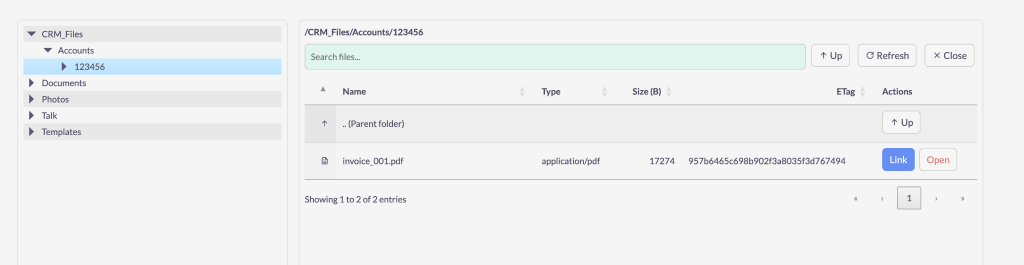
Combined, they give you:
- Full control over data & infrastructure
- A central place for customer data + documents
- Flexibility to adapt both systems to your business needs
The missing piece is a smooth integration between them – and that’s what our solution provides.
Key Features of Our SuiteCRM & Nextcloud Integration
1. File Management Directly Inside SuiteCRM
From any SuiteCRM record (for example an Account, Contact, Opportunity, Project, or Case), you can:
- Browse the related folder in Nextcloud without leaving SuiteCRM
- See a list of files and subfolders linked to that record
- Open, download, or copy the share link in one click
Your users stay in SuiteCRM while still working with all relevant documents.
2. Automatic Folder Structure per Customer or Project
No more manually creating folders for every new client.
Our integration can automatically:
- Create a main folder for each new Account or Project in Nextcloud
- Apply a consistent folder structure, such as:
Clients / {Account Name} / Contracts,Invoices,Projects,Support - Link that folder back to the corresponding record in SuiteCRM
This keeps your file storage clean and standardized across all clients.
3. Upload and Attach Files from SuiteCRM
When you receive a new document (contract, PO, invoice, specification, etc.) related to a customer, you don’t need to open Nextcloud in a new tab and search for the right folder.
Instead, you can:
- Upload files directly from the SuiteCRM record
- Choose or confirm the correct Nextcloud folder
- Have the newly uploaded file immediately visible to your team
Everything stays linked to the right customer, opportunity, or project.
4. One Source of Truth for Documents
With the integration in place:
- Your sales team knows exactly where to find proposals and agreements
- Your service team can see project documents and manuals
- Your finance team can quickly access invoices and supporting files
Everyone uses the same folders and files, all connected to SuiteCRM records.
5. Permissions and Security Aligned with Your Processes
Nextcloud already gives you strong access control, sharing options, and audit capabilities. Wikipedia
Our integration allows you to:
- Keep files on your own server or private cloud
- Use Nextcloud permissions and shares while still linking files from SuiteCRM
- Respect your internal rules for who can see which customer documents
This is especially important for companies handling sensitive customer data (legal, financial, healthcare, B2B services, etc.).
6. Better Collaboration Around CRM Records
The SuiteCRM & Nextcloud integration makes collaboration easier:
- Users can comment on documents or collaborate using Nextcloud apps (Office editors, notes, tasks, etc.)
- Links to documents can be shared with colleagues or customers
- All of this starts from the relevant SuiteCRM record, ensuring the context is never lost
Instead of having “orphan” files, every document has a clear customer or project attached to it.
Example Use Cases
Sales & Account Management
- Store proposals, contracts, and meeting notes for each Account in its own Nextcloud folder
- Access these files directly from the Account or Opportunity in SuiteCRM
- Quickly prepare for meetings, with everything in one place
Service & Projects
- Keep project documentation, technical specs, and deliverables linked to Projects or Cases
- Let your team update files in Nextcloud while tracking the project in SuiteCRM
- Make handovers between departments smoother and more transparent
Finance & Legal
- Save signed contracts, invoices, and legal documents in structured Nextcloud folders
- Link them to Accounts and Invoices in SuiteCRM
- Give finance and legal teams direct access from CRM when they review customer history
How the Integration Works (High-Level)
From a user’s perspective, the workflow is simple:
- Open a record in SuiteCRM
For example: an Account, Opportunity, Project, or Case. - Use the Nextcloud panel or subpanel
- See the linked folder and files
- Upload or manage documents directly from there
- Work with files in Nextcloud as usual
- Edit, comment, or share documents using Nextcloud
- Changes remain visible and accessible via SuiteCRM
Behind the scenes, the integration handles:
- Folder naming and structure
- Linking SuiteCRM records with Nextcloud paths
- Synchronizing file lists and metadata when needed
Benefits for Your Business
By integrating SuiteCRM with Nextcloud, you:
- Reduce time wasted searching for documents
- Ensure documentation is always stored in the right place
- Improve collaboration across sales, service, and back-office teams
- Keep control over data with self-hosted, open-source tools
- Build a scalable, future-proof CRM + file storage ecosystem
Ready to Connect SuiteCRM and Nextcloud?
If you are using both SuiteCRM and Nextcloud today, or planning to, integrating them is one of the fastest ways to:
- Clean up your document management
- Improve team productivity
- Make SuiteCRM the real “single source of truth” for your customer data
We provide professional SuiteCRM & Nextcloud integration services for companies worldwide.
Tell us about your current setup and how you manage customer documents today – we’ll suggest a practical integration approach tailored to your business.