SuiteCRM 8 Plugin: Best Add-ons & How to Choose
Looking for the right SuiteCRM 8 plugin to extend your CRM? SuiteCRM 8 introduced a modern Angular front end and a new extension framework, and the plugin ecosystem has grown to match it. This guide explains what a SuiteCRM 8 plugin is, the main categories worth knowing, how to choose one that is truly version‑8 compatible, and where to download plugins built by Mien Trung Soft and the wider community.
TL;DR — Key takeaways
- A SuiteCRM 8 plugin is an add‑on that extends SuiteCRM 8 with new features — automation, integrations, UI, reporting — without modifying the CRM core.
- SuiteCRM 8 uses a new extension framework and Angular UI, so always confirm a plugin is tested on SuiteCRM 8.x, not only 7.x.
- Mien Trung Soft builds and maintains a growing catalog of SuiteCRM 8‑native plugins across productivity, AI, integrations, and billing.
- Browse the full, up‑to‑date list on the Mien Trung Soft store.
- For plugins from other developers, search the official SuiteCRM Store.
What is a SuiteCRM 8 plugin?
A SuiteCRM 8 plugin (also called an add‑on or extension) is a packaged piece of software that adds new capabilities to SuiteCRM 8 — such as a Kanban board, an email or payment integration, AI writing tools, or advanced reporting — while keeping the CRM upgrade‑safe. Well‑built SuiteCRM 8 plugins live in the extension framework and custom/ layer rather than editing core files, so your instance stays maintainable when you upgrade.
Why SuiteCRM 8 plugins are different from SuiteCRM 7
SuiteCRM 8 is not just a re‑skin of version 7. It ships a modern Angular‑based interface layered on top of the legacy engine, plus a dedicated extension framework for registering front‑end and back‑end logic. Because of this, a plugin written only for SuiteCRM 7 may not render correctly in the new UI. When you evaluate a SuiteCRM 8 plugin, check that the vendor explicitly supports 8.x and ideally offers a native version‑8 experience — not just a legacy module bridged into the new shell.
Popular categories of SuiteCRM 8 plugins
The plugins below are developed and maintained by Mien Trung Soft for SuiteCRM 8. Explore any of them on the Mien Trung Soft store.
Productivity & user interface
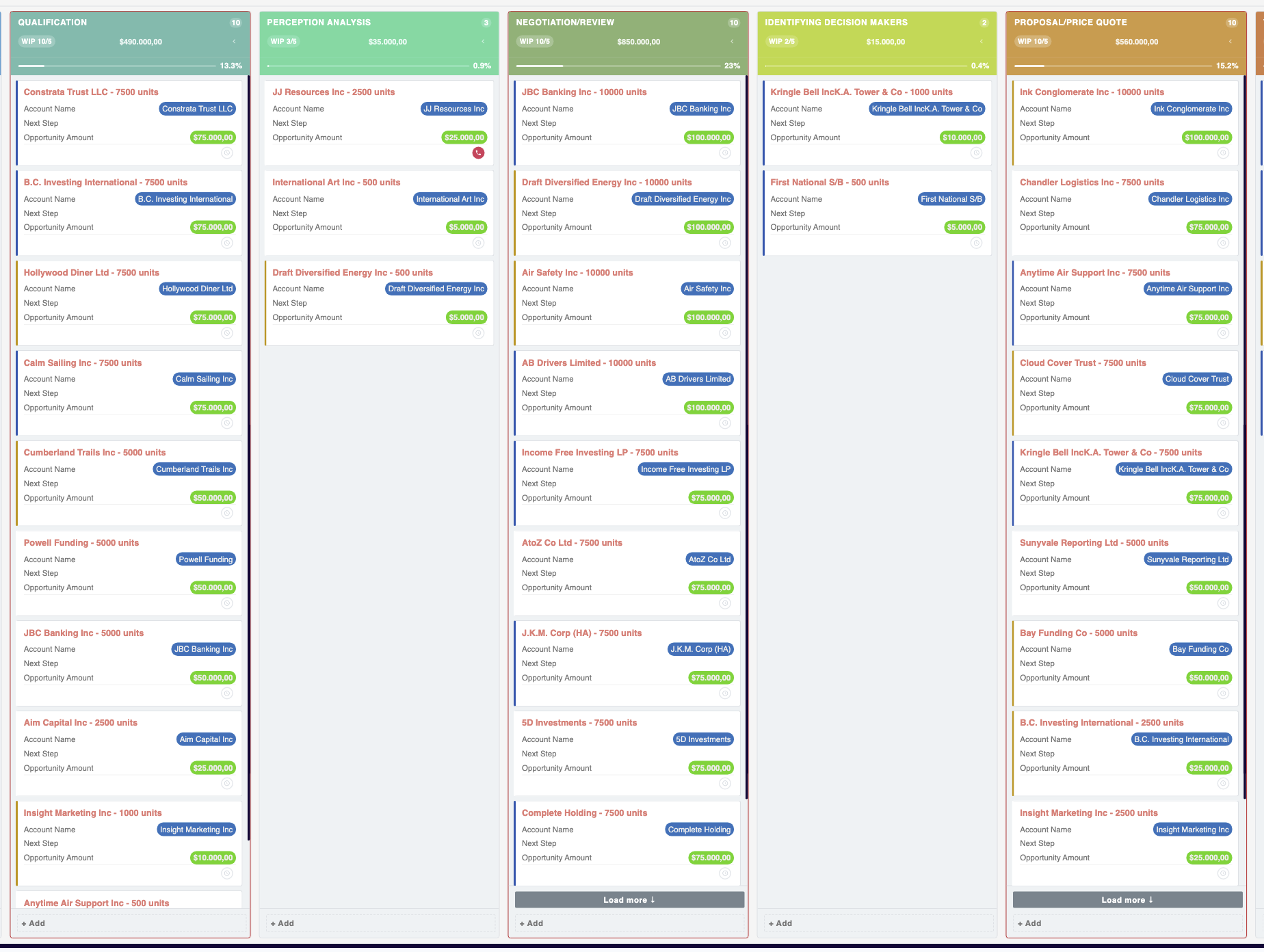
- MTS Kanban — drag‑and‑drop pipeline boards with stage gates, WIP limits, and inline editing.
- MTS Organisation Chart — interactive org chart for accounts, contacts, and employees.
- MTS Field Highlight — highlight important fields with conditional colors.
- MTS Quick Search — faster, smarter global search.
- MTS Dynamic View — conditional layouts that adapt the record view.
- MTS History Timeline / History Summary — a unified activity history per record.
- MTS SuiteCRM 8 Theme Editor — customize the look and feel without touching code.
Automation, AI & scoring
- MTS AI Email Writer — draft context‑aware emails inside SuiteCRM.
- MTS Record Score — score and rank records on your own rules.
- MTS Notification — real‑time in‑app notifications.
- MTS Code Generator — generate unique, formatted codes for records.
Integrations
- MTS Stripe Integration — connect payments and invoices to Stripe.
- MTS Telegram Notify — push CRM events to Telegram.
- MTS Typeform Integration — capture Typeform responses as CRM records.
- WhatsApp & VIES — messaging and EU VAT validation add‑ons.
Billing, time & administration
- MTS Advanced Invoice — richer invoicing and PDF output.
- MTS Timesheet — track billable time against projects and cases.
- MTS Cleaner — bulk clean and maintain your database.
- MTS User Activity Log — audit who did what, and when.





How to choose the right SuiteCRM 8 plugin
- Confirm SuiteCRM 8 compatibility. Look for a stated 8.x version and, ideally, native Angular support.
- Prefer core‑safe add‑ons. Plugins that use the extension framework and
custom/keep upgrades painless. - Check support and updates. An actively maintained plugin protects you against future SuiteCRM releases.
- Match the business need, not the feature list. Start from the workflow you want to improve, then pick the plugin that fits.
Browse all SuiteCRM 8 plugins by Mien Trung Soft
Mien Trung Soft has developed 40+ SuiteCRM add‑ons since 2017, with a growing line of SuiteCRM 8‑native plugins. See the full catalog, screenshots, pricing, and installation instructions on our store.
👉 Explore all SuiteCRM 8 plugins on the Mien Trung Soft store
Related guide: Learn how to put these plugins to work — read How to Standardize Your SuiteCRM Sales Process with Kanban.
Frequently asked questions
What is a SuiteCRM 8 plugin?
A SuiteCRM 8 plugin is an add‑on that extends SuiteCRM 8 with new features — such as automation, integrations, UI enhancements, or reporting — without modifying the CRM core, so the system stays upgrade‑safe.
Are SuiteCRM 7 plugins compatible with SuiteCRM 8?
Not always. SuiteCRM 8 adds a new Angular interface and extension framework. Some SuiteCRM 7 modules still run through the legacy layer, but for the best experience choose plugins the vendor has explicitly tested on SuiteCRM 8.x.
Where can I download SuiteCRM 8 plugins?
You can download SuiteCRM 8 plugins from the Mien Trung Soft store for Mien Trung Soft add‑ons, or from the official SuiteCRM Store for plugins from other developers.
Do SuiteCRM 8 plugins modify the core?
Well‑designed plugins do not. They register their logic through the SuiteCRM 8 extension framework and the custom/ directory, keeping your installation clean and upgrade‑safe.
How much do SuiteCRM 8 plugins cost?
Pricing varies by plugin and vendor, from free community add‑ons to one‑time or subscription licenses. Check the product page on the store for current pricing and licensing terms.
Looking for SuiteCRM 8 plugins from other developers?
Beyond Mien Trung Soft, the SuiteCRM community offers hundreds of add‑ons from independent developers and vendors. To browse plugins built by other providers, search the official SuiteCRM Store:
👉 Find more SuiteCRM 8 plugins on the SuiteCRM Store
Mien Trung Soft — SuiteCRM plugin development and customization since 2017 · 40+ add‑ons on the SuiteCRM Store. Need a custom SuiteCRM 8 plugin? Talk to our team.